Blacklist Contacts1.0.6
Publisher Description
Blacklist Contacts
the best application to block call and sms
LAST VERSION: 1.0.4
Blacklist Contacts allows you to block calls and text messages at certain times of the day or on particular days. Choose “what and when” and Blacklist Contacts will make sure that no one disturbs you.
Blacklist Contacts allows you to block anonymous numbers, numbers of your choice or all numbers. You can decide the hours and the and no one will disturb you. Also, if you want, you can password-protect the lists of numbers to block.
Blacklist Contacts also provides you an handy widget with which you can immediately know which calls and text messages are being blocked. To protect your privacy, the widget will display blocked calls and sms without showing the numbers that you choose to protect with a password.
Add Contacts you want, choose the hours and choose the days, at this point, calls and text messages that you have chosen to block, do not disturb you anymore.
Blacklist Contacts is for those who want more privacy and for those who do not wish to be disturbed during meetings or special moments.
In addition "Blacklist Contacts" prevent from reading calls and sms contacts that you have password protected.
HOW TO USE:
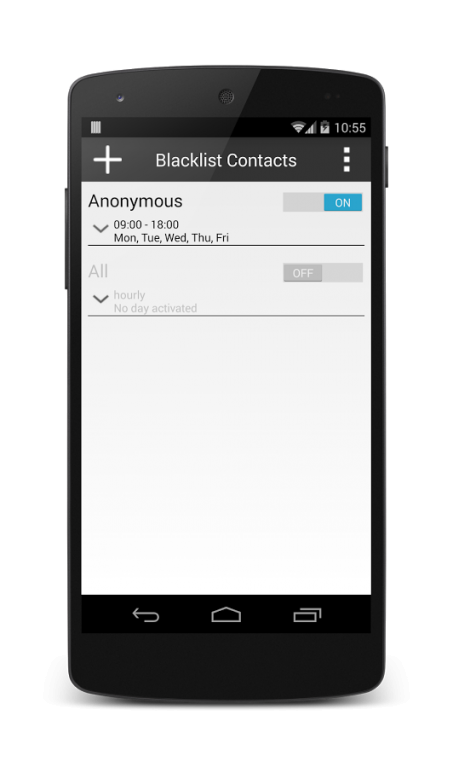
BlackList Contacts provides two predefined lists: "Anonymous" and "All". The first list allows you to block all anonymous calls, the second one allows you to block all numbers.
For each list you can choose the time at which the list is active. You can also choose which days the list is active.
Remember to activate the desired list by turning on the control to the right of the list.
You can create new lists by pressing the button "+"
Once you've created the list, you can add contacts to this list by pressing the "Pencil" image to the right of this list.
In the new screen you can add contacts by pressing the "+" button.
You can choose contacts from the list or create new one
For each contact, you can choose whether to block calls or SMS or both.
Features
- Block calls and text messages from anonymous numbers
- Block calls and text messages from all numbers
- Block calls and text messages of entire lists of numbers
- Choose hours and days in which block of calls and text messages
- Choose whether to protect your lists with a password
- Integrated Phonebook
- Add and delete lists, contacts and SMS
- User interface clean and easy to use
- Automatic start
- Widget to konw calls and sms blocked
- Log file which stores calls and sms blocked
Follow us on Facebook and Twitter, you can participate in our contests to win lots of prizes.
Please follow us on Twitter, Facebook and Google+ (often we give free codes for our applications)
https://twitter.com/HighTouch_it
https://www.facebook.com/HighTouchIT
https://plus.google.com/b/103354478635327690595/
SUPPORT
You don't know how to use the application? Email to help@hightouch.it and we will answer all your questions.
About Blacklist Contacts
The company that develops Blacklist Contacts is High Touch. The latest version released by its developer is 1.0.6.
To install Blacklist Contacts on your Android device, just click the green Continue To App button above to start the installation process. The app is listed on our website since 2014-09-30 and was downloaded 25 times. We have already checked if the download link is safe, however for your own protection we recommend that you scan the downloaded app with your antivirus. Your antivirus may detect the Blacklist Contacts as malware as malware if the download link to com.HighTouch.blacklistcontacts is broken.
How to install Blacklist Contacts on your Android device:
- Click on the Continue To App button on our website. This will redirect you to Google Play.
- Once the Blacklist Contacts is shown in the Google Play listing of your Android device, you can start its download and installation. Tap on the Install button located below the search bar and to the right of the app icon.
- A pop-up window with the permissions required by Blacklist Contacts will be shown. Click on Accept to continue the process.
- Blacklist Contacts will be downloaded onto your device, displaying a progress. Once the download completes, the installation will start and you'll get a notification after the installation is finished.
Program Details
System requirements
Download information
Pricing
Version History
version 1.0.6
posted on 2014-09-30
Version 1.0.6,- Added the ability to add special numbers. Ex: *600, *600*, 600*,- Some bug fixed,Version 1.0.5,- Improved Graphics,- Improved Performance,- Some bug fixed,Version 1.0.4,- Added the possibility to check the status of the service and restart it,- Added the possibility to remove the password from a list,- Some bugs fixes
